Zhuque AI Detection SkillLet your agent check drafts for AI-generated content
An open-source (MIT) agent skill and CLI built on Tencent Zhuque AI detection, installed with one command. Give a draft to Codex, Claude Code, Cursor, or another agent to check it segment by segment, check drafts in batches, compare two revisions, and export a report.
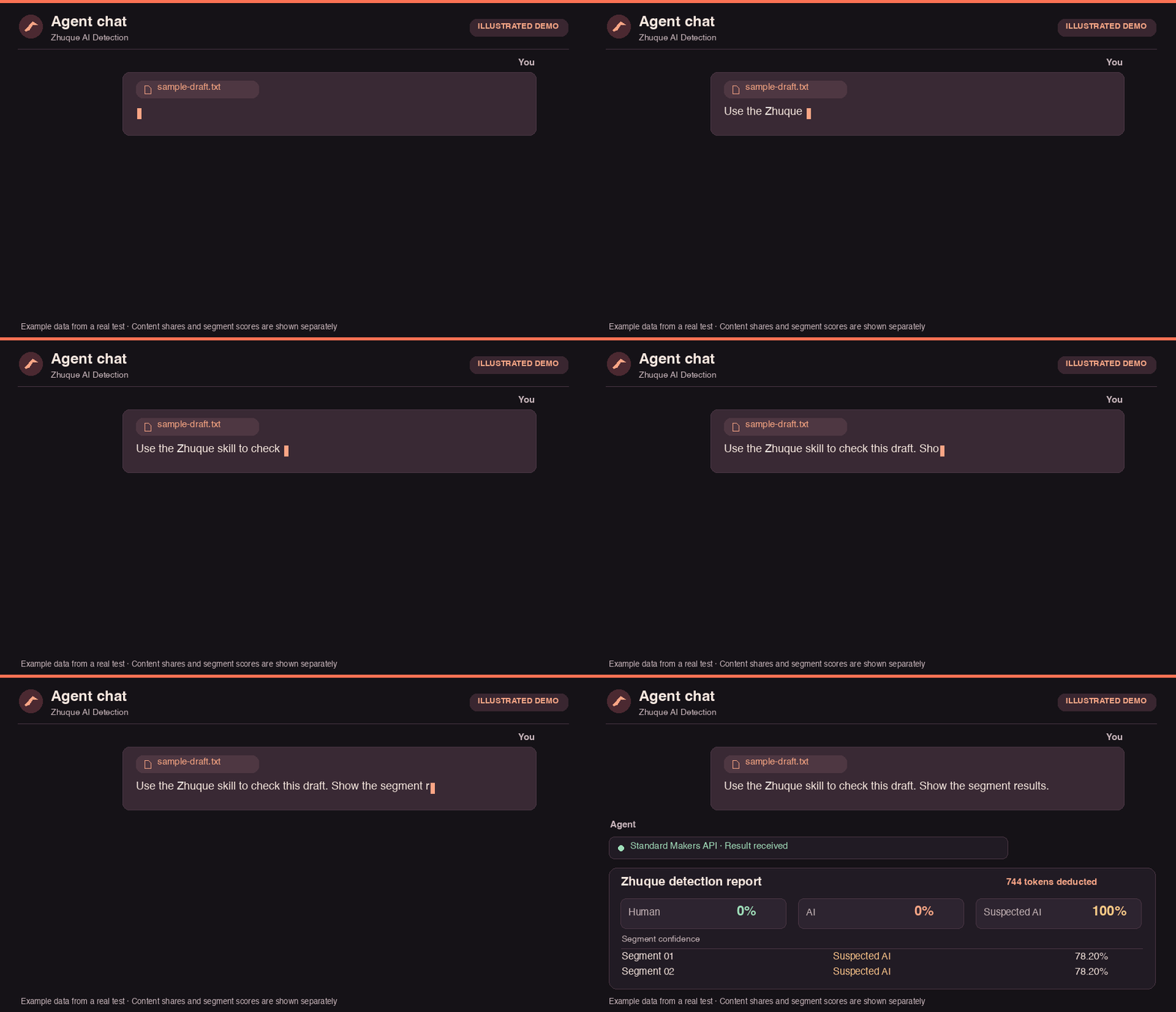
The chat is illustrated. The report figures come from a live API test.
Product highlights
Segment-level results
See human, AI, and suspected AI content shares separately, with a label and confidence score for each segment, so you know which paragraphs to review.
Batch checks
Preflight paths, formats, and readability locally, then submit drafts one by one. Successful, failed, and unsent items are listed separately.
Revision comparison
Check a first draft and a revision with the same segment settings and see percentage-point changes by label.
Report export
Export results as Markdown or JSON. The source text is omitted by default.
What it does
Single draft and segment checks
- Input
- Pasted text, TXT, Markdown, DOCX
- Output
- Human, AI, and suspected AI content shares and segment labels
Batch checks
- Input
- A list of draft files
- Output
- Per-file results, including successful, failed, and unsent items
Revision comparison
- Input
- A first draft and a revision
- Output
- Percentage-point changes by label and segment results for both drafts
Report export
- Input
- Results from a single check, batch, or comparison
- Output
- Markdown or JSON, with the source text omitted by default
Enterprise Pro
- Input
- Text, image files, or public image URLs
- Output
- Text segment results or an image confidence score. Explicit opt-in, billed per call
Zhuque website
- Input
- Text, images, or video
- Output
- Open the Zhuque text checker or image and video checker manually
What to ask your agent
Check a single draft and show segments
Use zhuque-ai-detect-skill to check the draft I provided. Show human, AI, and suspected AI content shares. List each segment's label and confidence by number, and show the actual tokens deducted.
Compare two versions
Use zhuque-ai-detect-skill to compare first.md and revised.docx. Use the same segment settings for both. Show percentage-point changes by label and flag segments worth reviewing in each draft.
Check a batch and save the report
Use zhuque-ai-detect-skill to check A.md, B.docx, and C.txt. Preflight those three files, then check them individually. Save successful, failed, and unsent items to report.md and omit the source text.
Install and configure
Install with one command
Requires Node.js 22.20+ and Git, and works the same in macOS, Linux, and Windows PowerShell. This example installs for Codex; for other clients, swap --agent for a value below. Drop --global to install for the current project only.
npx skills add byteee-com/zhuque-ai-detect-skill --global --agent codex --yesConfigure your key
Create a key under Makers → Models → API Key in the EdgeOne console, run setup, and paste it when prompted. Input is hidden and the key is stored in your local user configuration.
cd ~/.agents/skills/zhuque-ai-detect-skill
python3 scripts/zhuque.py setupCheck and start
A makers.status of ready means you're set. Start a new agent chat to use the skill. On Windows, use py -3 .\scripts\zhuque.py.
python3 scripts/zhuque.py doctorCodex
--agent codex
Type $ and select the skill.
Claude Code
--agent claude-code
Type /zhuque-ai-detect-skill.
Cursor
--agent cursor
Select the skill from the / menu in a local Agent chat.
WorkBuddy
Skills → Add Skill → Upload Skill, then import a ZIP
Name zhuque-ai-detect-skill in chat.
On macOS, the Skills CLI has been verified to install into Codex, Claude Code, and Cursor, and live API checks have been run in Codex. For WorkBuddy, download the ZIP from GitHub and import it manually.
API checks send the content you choose to Tencent Zhuque. Treat the results as a starting point for review and weigh them with other evidence. Zhuque is an AI-generated content detection service from Tencent. This skill is developed by byteee and is not an official Tencent product.




Start with a30-minute conversation
Tell us what you're working on. We'll suggest a practical AI approach and outline a proof of concept.