IP300
SIP desktop dispatch station
IP300 gives dispatchers one place to make calls, monitor lines, use two-way intercom, and broadcast announcements to connected terminals. It uses standard SIP and comes with a 10.1-inch color touchscreen, a gooseneck microphone, an 8 MP camera, and 112 programmable DSS keys for use in energy, manufacturing, transportation, and emergency response.


Full-duplex HD Audio & Video
Echo cancellation, noise reduction, packet loss concealment, and a dynamic jitter buffer help keep audio clear. The 8 MP camera has a built-in privacy cover.
Individual, group, and all-station calls
Program 112 DSS keys for individual calls, broadcast groups, or dispatch by zone. Connect IP300 to BPBX for group paging.
Industrial-grade Hardware
IP300 runs Android 9.0 and includes a 10.1-inch 1280 × 800 touchscreen and PoE. It operates at 0–45 °C and 10–95% relative humidity for use in factories, energy facilities, and command vehicles.
Standard SIP connectivity
Connect to an existing IP communications network or compatible third-party platform. IP300 supports SIP 2.0 over UDP, TCP, and TLS, plus RTP/SRTP, IPv4/IPv6, 802.1X, LLDP, and QoS.
Key features

Desktop dispatch controls
The desktop unit combines a 10.1-inch touchscreen, gooseneck microphone, HD handset, and two RJ9 jacks. Use the handset, speakerphone, or headset and check device status on the LED indicator. Dispatch, dialing, broadcast, intercom, and contacts are available from the same console.

112 Programmable DSS Keys (28×4)
Assign the 112 keys, arranged in 28 columns and four rows, to contacts, broadcast groups, or emergency shortcuts. Operators can call or broadcast with one tap.

Dispatch, broadcast, and intercom views
See which terminals are online and place calls in the dispatch view. Select music and control playback by zone in the broadcast view. The intercom view identifies the speaker and listeners and gives operators a one-tap microphone control.

Video calling and camera integration
Use the built-in 8 MP camera or connect site cameras through Hikvision HCNetSDK. Video calls support H.264 and optional H.265, resolutions from CIF to 1080p, and full-screen viewing of remote video.

Remote management and batch updates
The web console shows device status and manages dispatch, intercom, broadcasts, monitoring, tasks, and contacts. Administrators can push settings, update firmware, back up data, review logs, and reset devices remotely.

Desktop fleet manager
The desktop tool scans subnets and lists each device's IP address, SIP registration, app version, and status. It refreshes every 30 seconds and supports batch APK upgrades, configuration backup and restore, log exports, and centralized licensing.
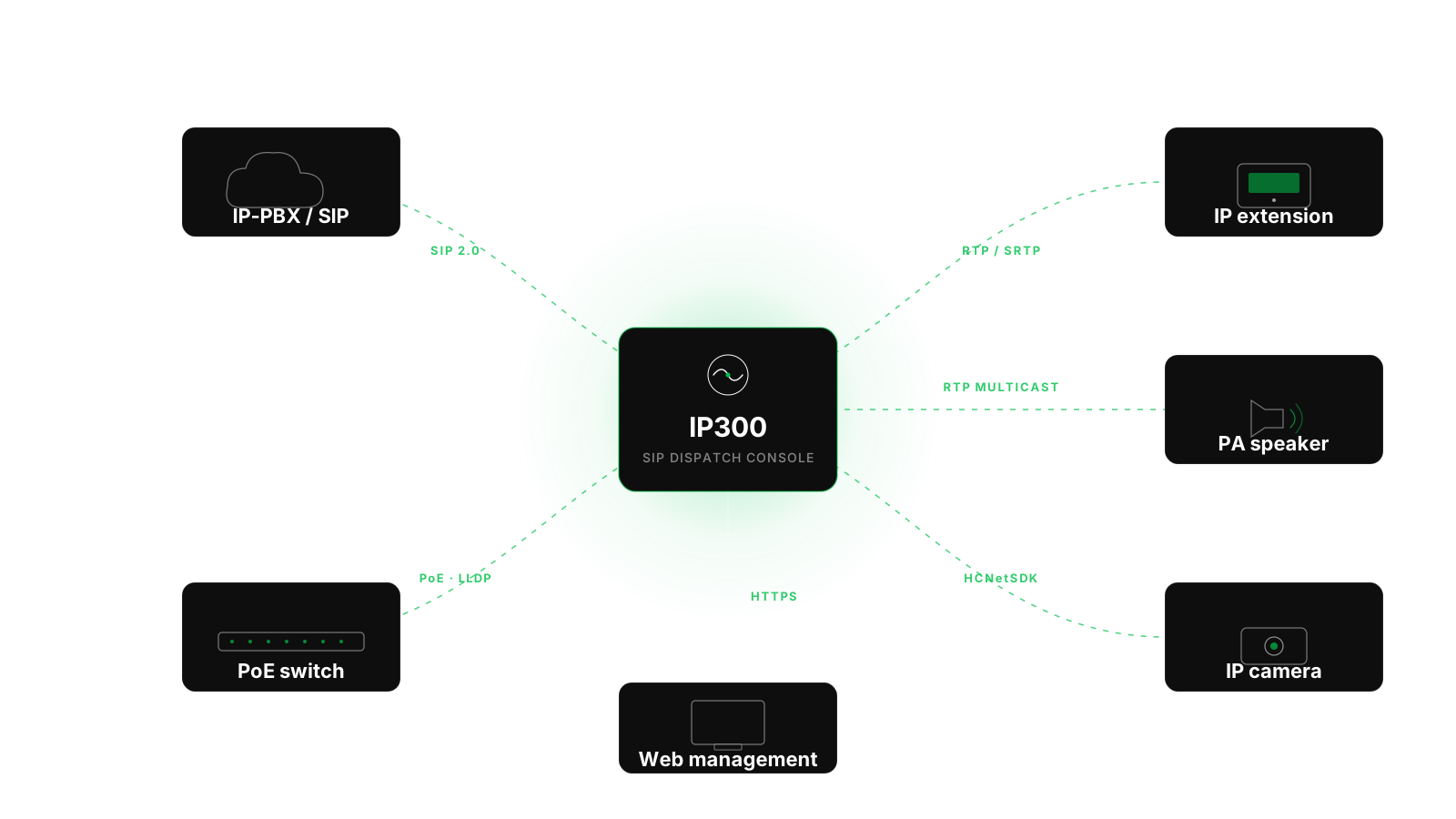
Integration with SIP systems
Register IP300 with a SIP server or IP-PBX and connect IP terminals, cameras, speakers, and an administration PC through a PoE switch. SIP 2.0, RTP/SRTP, HCNetSDK, and HTTPS support integration with compatible third-party networks.
Where it's used
Energy & Industrial Dispatch
Connect control rooms and field crews with full-duplex communications and use IP broadcasts for urgent alerts and production coordination in plants, mines, and factories.
Public Safety & Emergency Response
Use group calls to reach responders, send announcements to specific zones, and stream live video to command centers and field command vehicles.
Transportation Command Centers
Coordinate busy airports, subway systems, highway tunnels, and ports with HD voice, live video, and real-time announcements.
Campuses, Buildings & Large Venues
Combine security intercom and public address at industrial parks, hospitals, schools, and arenas. Play music by zone and override it in an emergency with one tap.
Specifications
- OS
- Android 9.0
- Display
- 10.1″ 1280×800 color touchscreen
- Camera
- 8MP, adjustable angle, privacy cover
- Microphone
- Gooseneck, unidirectional, 20 Hz–20 kHz, SNR ≥60 dB
- Physical Keys
- 5 keys (Vol±, Home, Speaker, Back)
- Virtual DSS Keys
- 112 keys (28×4)
- Network
- 10/100/1000 Mbps Ethernet (bridging) + 2.4/5 GHz Wi-Fi + Bluetooth 5.0
- Protocols
- SIP 2.0 (UDP/TCP/TLS), RTP/RTCP/SRTP, STUN, DHCP, LLDP, CDP, 802.1x, OpenVPN, SNTP, HTTP/HTTPS, FTP/TFTP
- Audio Codecs
- G.711a/u, G.729AB, iLBC, G.722, Opus; AEC / NR / PLC
- Video Codecs
- H.264 / H.265 (optional); CIF / VGA / 4CIF / 720P / 1080P; 64 kbps–4 Mbps; 5–30 fps
- Ports
- RJ9 ×2 (handset / headset), RJ45 ×2 (network / PC bridge), USB 2.0 ×1, security slot ×1
- Power
- PoE (2W–9.77W) or 5 V, 2 A adapter (1.2W–7.75W)
- Operating Environment
- 0–45 °C, 10–95% RH
- Dimensions
- 309 × 214 × 187 mm (angle 1) / 309 × 226 × 167 mm (angle 2)
- Colors
- Gunmetal / White
- Mounting
- Desktop
Frequently asked questions
Yes. IP300 can register with SIP-compliant IP-PBX systems, session border controllers, and dispatch servers. It supports SIP 2.0 over UDP, TCP, and TLS, along with RTP/RTCP/SRTP, IPv4/IPv6, 802.1X, LLDP/CDP, and QoS.

Start with a30-minute conversation
Tell us what you're working on. We'll suggest a practical AI approach and outline a proof of concept.