
IP300Unified Communications for Dispatch
An IP-based dispatch system that brings voice, video, public address, intercom, alarms, and maps into one console. It serves emergency response, energy, transportation, campus operations, and public safety teams.
Challenge
Analog intercom limited coverage and left dispatch teams working across separate systems. Operations centers needed to coordinate hundreds or thousands of devices from different vendors, bring voice, video, and announcements into one console, and keep recordings for audits.
Solution
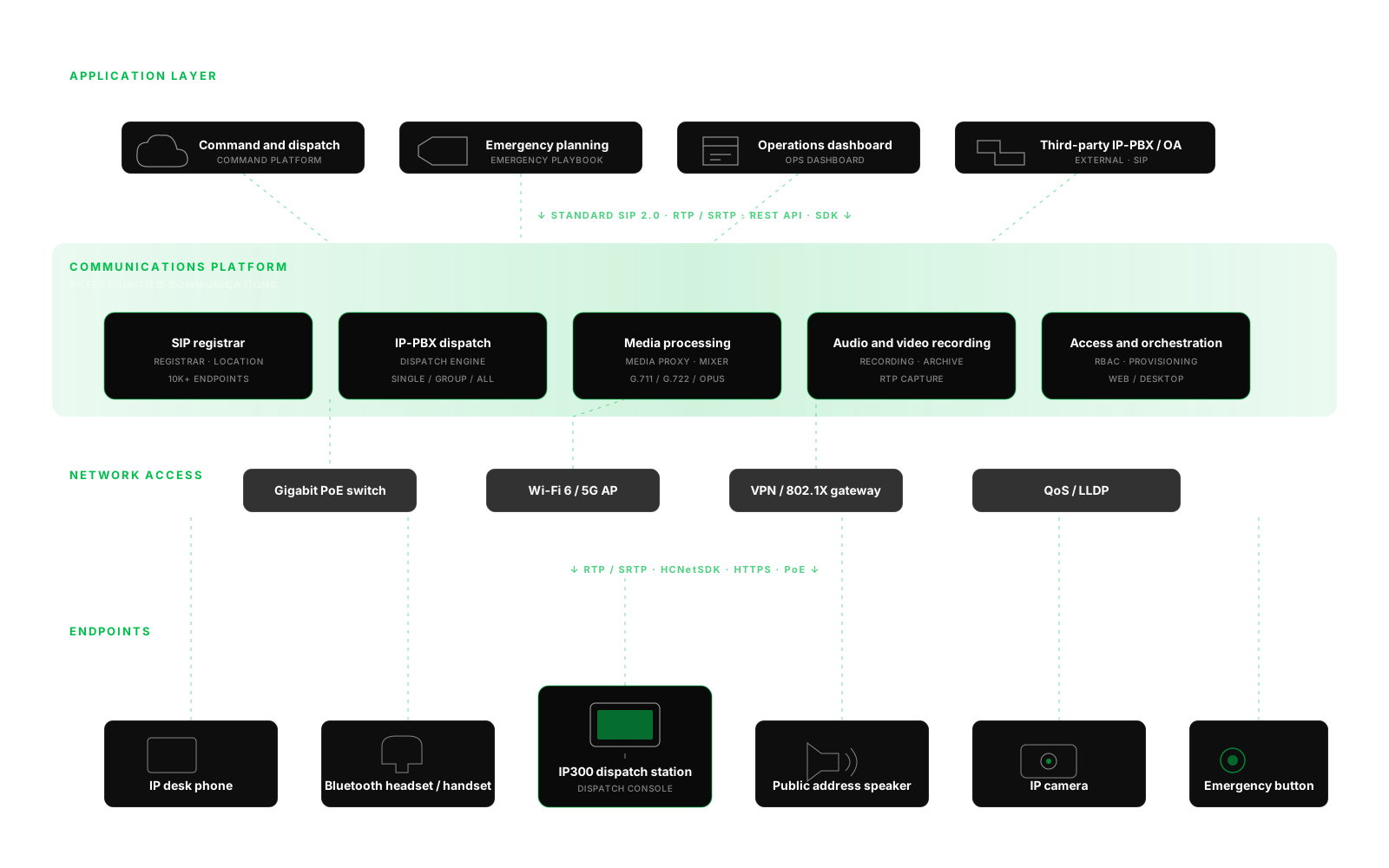
The IP300 station connects to business systems through standard SIP and an SDK. It connects to IP terminals, cameras, speakers, and emergency buttons over PoE, Wi-Fi, or 5G. The platform provides SIP registration, IP-PBX dispatch, media handling, recording, and role-based access and orchestration.
Outcome
The system is in use in emergency response, energy, transportation, education, and industrial sites. One console supports more than 1,000 concurrent terminals and dispatch response times under 200 ms. The web console and desktop manager provide live device status, configuration, batch updates, and playback.
Round-the-clock operation
Embedded Linux, byteee's SIP stack, and industrial-grade hardware support round-the-clock operation in emergency response, energy, and transportation.
One console for dispatch
Dispatchers can manage voice, video, public address, intercom, maps, alarms, and playback from the same station.
Integration with existing systems
SIP, RTP, the SDK, and open APIs connect the system to third-party IP-PBX, carrier IMS, security systems, and emergency planning tools. Bring office phones, mobile phones, group intercom, and conferencing into the same network.
System architecture
Key capabilities
Intercom for individuals, groups, or all stations
Use two-way video intercom between stations for individual, group, or all-station calls. Calls are archived automatically for playback.
Public address by zone, schedule, or emergency
Play music or scheduled announcements by zone. In an emergency, override playback with a recording, live speech, or an external audio source such as CD or radio.
Internal and external calling
Dial office extensions, mobile phones, and the public telephone network. Route incoming calls to a dispatcher and transfer them with one tap.
Call previews and live camera feeds
Use the built-in 8 MP camera or connect IP cameras through HCNetSDK. Preview video when calls arrive, switch remote feeds to full screen, and send recordings to the command center.
Live map with automatic alarm location
When someone presses an emergency button, the map shows the incident location and nearby camera feeds.
Searchable audio and video recordings
Archive calls, broadcasts, and video sessions automatically. Search recordings by time, terminal, or event from the web console.
Web console and desktop fleet manager
Use the web console to manage status, dispatch, intercom, broadcasts, monitoring, tasks, and contacts. The desktop tool scans subnets, updates APKs in batches, and manages licenses centrally.
Integration through open protocols
Register IP300 as a SIP endpoint with a compatible third-party IP-PBX or use it as the main station. Supported protocols and integrations include SIP 2.0 over UDP, TCP, and TLS, RTP/SRTP, HCNetSDK, HTTPS, and OpenVPN.
Where it's used
Emergency Command Center
Coordinate police, fire, and emergency services with live video, one-tap emergency procedures, and collaboration across dispatch stations.
Energy & Industrial Dispatch
Connect control rooms to field crews with full-duplex voice, zone-based emergency broadcasts, crew intercom, live camera feeds, and call recording.
Transportation Hubs
Coordinate towers, vehicles, tunnels, and terminals with HD voice, live video, and emergency announcements across stations, trains, and gates.
Campuses, Buildings & Public Safety
Combine security intercom and public address, with zone-based music, emergency override, and one-tap SOS for elevators, garages, and outdoor areas.

Start with a30-minute conversation
Tell us what you're working on. We'll suggest a practical AI approach and outline a proof of concept.